
您可以回顾我们的最早版本Release V1.0,开发文档:http://m.blog.gvicyunjin.cn:8080/archives/ph
版本前瞻
更新内容:
1.全面重构UI,使画面更美观!
2.支持所有字符!(目前开放汉字,英文和符号)
3.放弃反向加密方案,使用三轮加密机制!
4.引入哈希244,哈希256函数,使加密算法更安全!
5.docker版本上线!
截图:
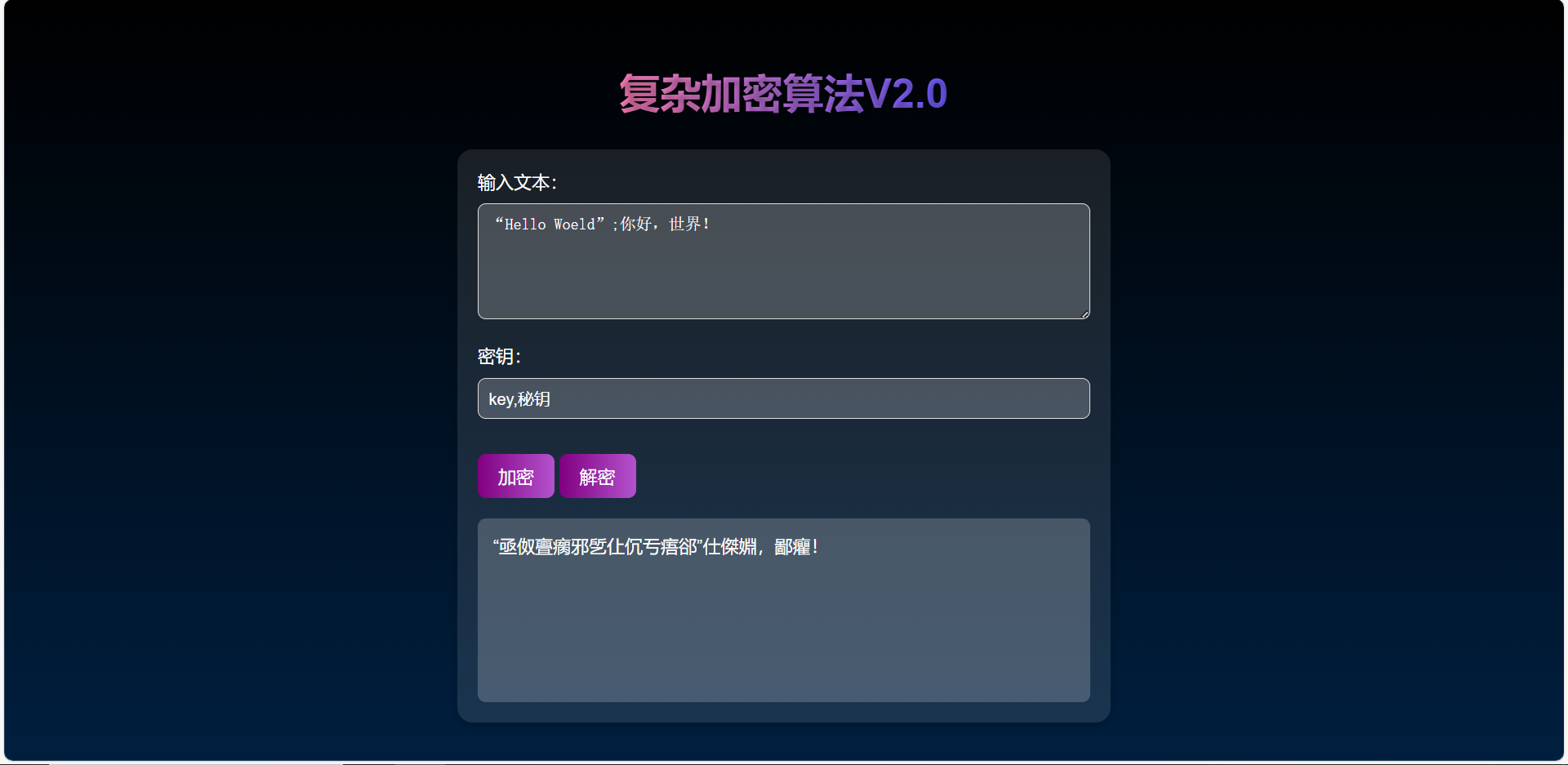
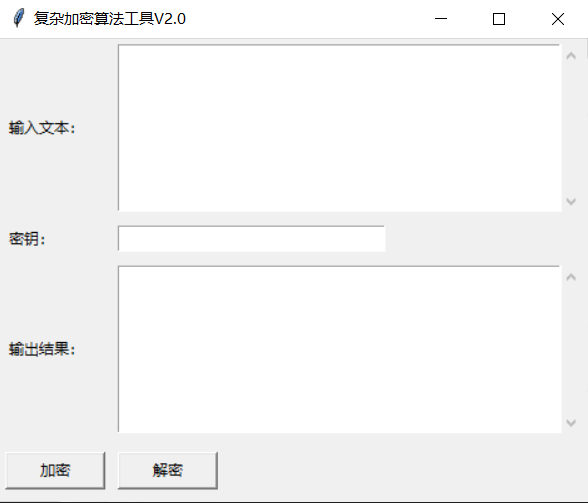
在线网页地址:复杂加密算法V2.0
1.收集资料
同V1.0
2.发现问题
同V1.0
3.确定研究目标
同V1.0
4.代码编写
4.1.python版
源代码
import hashlib
import tkinter as tk
from tkinter import messagebox, scrolledtext

# 动态生成包含所有汉字及常见符号的字符集
def generate_allowed_chars():
    # 包括所有常见可打印字符(ASCII 32-126)和汉字(\u4E00-\u9FFF)
    allowed_chars = ''.join(chr(i) for i in range(32, 127))  # 包括常见标点符号、数字、字母
    for codepoint in range(0x4E00, 0x9FFF + 1):  # 汉字范围
        allowed_chars += chr(codepoint)
    return allowed_chars

ALLOWED_CHARS = generate_allowed_chars()

def generate_shifts(key):
    """生成基于密钥的偏移序列。"""
    return [(ord(char) + index) for index, char in enumerate(key)]

def expand_key_sha256(key, length):
    """使用 SHA-256 扩展密钥,截取指定长度。"""
    hash_object = hashlib.sha256(key.encode())
    return hash_object.hexdigest()[:length]

def expand_key_sha244(key, length):
    """使用 SHA-224 扩展密钥,截取指定长度。"""
    hash_object = hashlib.sha224(key.encode())
    return hash_object.hexdigest()[:length]

def encrypt_decrypt_once(text, key_shifts, allowed_chars, encrypt=True):
    """单轮加密或解密操作。"""
    charset_len = len(allowed_chars)
    result = []

    for i, char in enumerate(text):
        if char not in allowed_chars:
            result.append(char)  # 非字符集字符直接保留
            continue

        shift = key_shifts[i % len(key_shifts)]
        shift = shift if encrypt else -shift
        idx = allowed_chars.index(char)
        new_idx = (idx + shift) % charset_len
        result.append(allowed_chars[new_idx])

    return ''.join(result)

def complex_encrypt(text, key):
    """执行三轮加密。"""
    # 第一次加密
    key_shifts = generate_shifts(key)
    first_encryption = encrypt_decrypt_once(text, key_shifts, ALLOWED_CHARS, encrypt=True)

    # 第二次加密(SHA-256扩展密钥)
    extended_key_sha256 = expand_key_sha256(key, len(first_encryption))
    extended_shifts_sha256 = generate_shifts(extended_key_sha256)
    second_encryption = encrypt_decrypt_once(first_encryption, extended_shifts_sha256, ALLOWED_CHARS, encrypt=True)

    # 第三次加密(SHA-224扩展密钥)
    extended_key_sha244 = expand_key_sha244(key, len(second_encryption))
    extended_shifts_sha244 = generate_shifts(extended_key_sha244)
    final_encryption = encrypt_decrypt_once(second_encryption, extended_shifts_sha244, ALLOWED_CHARS, encrypt=True)

    return final_encryption

def complex_decrypt(encrypted_text, key):
    """执行三轮解密,顺序与加密相反。"""
    # 第三次解密(SHA-224扩展密钥)
    extended_key_sha244 = expand_key_sha244(key, len(encrypted_text))
    extended_shifts_sha244 = generate_shifts(extended_key_sha244)
    second_decryption = encrypt_decrypt_once(encrypted_text, extended_shifts_sha244, ALLOWED_CHARS, encrypt=False)

    # 第二次解密(SHA-256扩展密钥)
    extended_key_sha256 = expand_key_sha256(key, len(second_decryption))
    extended_shifts_sha256 = generate_shifts(extended_key_sha256)
    first_decryption = encrypt_decrypt_once(second_decryption, extended_shifts_sha256, ALLOWED_CHARS, encrypt=False)

    # 第一次解密
    key_shifts = generate_shifts(key)
    original_text = encrypt_decrypt_once(first_decryption, key_shifts, ALLOWED_CHARS, encrypt=False)

    return original_text

# GUI 部分
def encrypt_action():
    """加密操作。"""
    text = input_text.get("1.0", tk.END).strip()
    key = key_entry.get()
    if not text or not key:
        messagebox.showerror("错误", "请输入文本和密钥!")
        return
    encrypted_text = complex_encrypt(text, key)
    output_text.delete("1.0", tk.END)
    output_text.insert(tk.END, encrypted_text)

def decrypt_action():
    """解密操作。"""
    text = input_text.get("1.0", tk.END).strip()
    key = key_entry.get()
    if not text or not key:
        messagebox.showerror("错误", "请输入文本和密钥!")
        return
    decrypted_text = complex_decrypt(text, key)
    output_text.delete("1.0", tk.END)
    output_text.insert(tk.END, decrypted_text)

# 创建主窗口
root = tk.Tk()
root.title("复杂加密算法工具V2.0")

# 输入文本
tk.Label(root, text="输入文本:").grid(row=0, column=0, padx=5, pady=5, sticky="w")
input_text = scrolledtext.ScrolledText(root, width=50, height=10)
input_text.grid(row=0, column=1, padx=5, pady=5)

# 输入密钥
tk.Label(root, text="密钥:").grid(row=1, column=0, padx=5, pady=5, sticky="w")
key_entry = tk.Entry(root, width=30)
key_entry.grid(row=1, column=1, padx=5, pady=5, sticky="w")

# 输出文本
tk.Label(root, text="输出结果:").grid(row=2, column=0, padx=5, pady=5, sticky="w")
output_text = scrolledtext.ScrolledText(root, width=50, height=10)
output_text.grid(row=2, column=1, padx=5, pady=5)

# 按钮
encrypt_button = tk.Button(root, text="加密", command=encrypt_action, width=10)
encrypt_button.grid(row=3, column=0, padx=5, pady=10)

decrypt_button = tk.Button(root, text="解密", command=decrypt_action, width=10)
decrypt_button.grid(row=3, column=1, padx=5, pady=10, sticky="w")

# 运行主循环
root.mainloop()
运行要求:
python3.7及以上环境
4.2.docker版源代码
文件结构:
/ksmm
    ├── app.py           # Flask 后端代码
    ├── Dockerfile       # Dockerfile 配置
    ├── requirements.txt # Python 依赖
    ├── templates/
    │    └── index.html  # 前端 HTML 页面
    └── docker-compose.yml # Docker Compose 配置
app.py
from flask import Flask, render_template, request, jsonify
import hashlib

app = Flask(__name__)

ALLOWED_CHARS = ''.join(chr(i) for i in range(32, 127))  # 包括常见标点符号、数字、字母
for codepoint in range(0x4E00, 0x9FFF + 1):  # 汉字范围
    ALLOWED_CHARS += chr(codepoint)

def generate_shifts(key):
    return [(ord(char) + index) for index, char in enumerate(key)]

def expand_key_sha256(key, length):
    hash_object = hashlib.sha256(key.encode())
    return hash_object.hexdigest()[:length]

def expand_key_sha244(key, length):
    hash_object = hashlib.sha224(key.encode())
    return hash_object.hexdigest()[:length]

def encrypt_decrypt_once(text, key_shifts, allowed_chars, encrypt=True):
    charset_len = len(allowed_chars)
    result = []

    for i, char in enumerate(text):
        if char not in allowed_chars:
            result.append(char)
            continue

        shift = key_shifts[i % len(key_shifts)]
        shift = shift if encrypt else -shift
        idx = allowed_chars.index(char)
        new_idx = (idx + shift) % charset_len
        result.append(allowed_chars[new_idx])

    return ''.join(result)

def complex_encrypt(text, key):
    key_shifts = generate_shifts(key)
    first_encryption = encrypt_decrypt_once(text, key_shifts, ALLOWED_CHARS, encrypt=True)

    extended_key_sha256 = expand_key_sha256(key, len(first_encryption))
    extended_shifts_sha256 = generate_shifts(extended_key_sha256)
    second_encryption = encrypt_decrypt_once(first_encryption, extended_shifts_sha256, ALLOWED_CHARS, encrypt=True)

    extended_key_sha244 = expand_key_sha244(key, len(second_encryption))
    extended_shifts_sha244 = generate_shifts(extended_key_sha244)
    final_encryption = encrypt_decrypt_once(second_encryption, extended_shifts_sha244, ALLOWED_CHARS, encrypt=True)

    return final_encryption

def complex_decrypt(encrypted_text, key):
    extended_key_sha244 = expand_key_sha244(key, len(encrypted_text))
    extended_shifts_sha244 = generate_shifts(extended_key_sha244)
    second_decryption = encrypt_decrypt_once(encrypted_text, extended_shifts_sha244, ALLOWED_CHARS, encrypt=False)

    extended_key_sha256 = expand_key_sha256(key, len(second_decryption))
    extended_shifts_sha256 = generate_shifts(extended_key_sha256)
    first_decryption = encrypt_decrypt_once(second_decryption, extended_shifts_sha256, ALLOWED_CHARS, encrypt=False)

    key_shifts = generate_shifts(key)
    original_text = encrypt_decrypt_once(first_decryption, key_shifts, ALLOWED_CHARS, encrypt=False)

    return original_text

@app.route('/')
def index():
    return render_template('index.html')  # 渲染前端页面

@app.route('/encrypt', methods=['POST'])
def encrypt():
    data = request.get_json()
    text = data.get('text')
    key = data.get('key')
    encrypted_text = complex_encrypt(text, key)
    return jsonify({"encryptedText": encrypted_text})

@app.route('/decrypt', methods=['POST'])
def decrypt():
    data = request.get_json()
    text = data.get('text')
    key = data.get('key')
    decrypted_text = complex_decrypt(text, key)
    return jsonify({"decryptedText": decrypted_text})

if __name__ == "__main__":
    app.run(host="0.0.0.0", port=3333, debug=True)
/templates/index.html
<!DOCTYPE html>
<html lang="zh">
<head>
    <meta charset="UTF-8">
    <meta name="viewport" content="width=device-width, initial-scale=1.0">
    <title>复杂加密算法V2.0</title>
    <style>
        body {
            font-family: 'Arial', sans-serif;
            margin: 0;
            padding: 0;
            background: linear-gradient(to bottom, #000000, #001f3f); /* 背景色加深到更深的蓝色 */
            height: 100vh;
            display: flex;
            justify-content: center;
            align-items: center;
            flex-direction: column;
            color: white;
        }

        h1 {
            font-size: 2.5rem;
            margin-bottom: 30px;
            text-align: center;
            background: linear-gradient(to right, #ff7eb9, #6a5bff); /* 线性渐变字体颜色 */
            -webkit-background-clip: text;
            color: transparent;
            text-shadow: 2px 2px 5px rgba(0, 0, 0, 0.3);
        }

        .container {
            width: 90%;
            max-width: 600px;
            background: rgba(255, 255, 255, 0.1);
            padding: 20px;
            border-radius: 15px;
            box-shadow: 0px 4px 10px rgba(0, 0, 0, 0.2);
        }

        .input-group {
            margin-bottom: 20px;
        }

        label {
            font-size: 1.1rem;
            margin-bottom: 5px;
            display: block;
        }

        input, textarea {
            width: 100%;
            padding: 10px;
            margin-top: 5px;
            border-radius: 8px;
            border: 1px solid #ddd;
            background: rgba(255, 255, 255, 0.2);
            color: white;
            font-size: 1rem;
            box-sizing: border-box;
        }

        button {
            background: linear-gradient(to right, #800080, #b452cd); /* 按钮颜色橙色和青色渐变 */
            color: white;
            border: none;
            padding: 10px 20px;
            margin-top: 15px;
            font-size: 1.1rem;
            border-radius: 8px;
            cursor: pointer;
            transition: background 0.3s;
        }

        button:hover {
            background: linear-gradient(to right, #b452cd, #800080); /* 橙色和青色更深的渐变 */
        }

        .output-area {
            margin-top: 20px;
            padding: 15px;
            background: rgba(255, 255, 255, 0.2);
            border-radius: 8px;
            font-size: 1.1rem;
            height: 150px;
            overflow-y: auto;
        }
    </style>
</head>
<body>
    <h1>复杂加密算法V2.0</h1>

    <div class="container">
        <div class="input-group">
            <label for="inputText">输入文本:</label>
            <textarea id="inputText" rows="5"></textarea>
        </div>

        <div class="input-group">
            <label for="key">密钥:</label>
            <input type="text" id="key">
        </div>

        <button id="encryptButton">加密</button>
        <button id="decryptButton">解密</button>

        <div class="output-area" id="outputArea"></div>
    </div>

    <script>
        const encryptButton = document.getElementById('encryptButton');
        const decryptButton = document.getElementById('decryptButton');
        const inputText = document.getElementById('inputText');
        const keyInput = document.getElementById('key');
        const outputArea = document.getElementById('outputArea');

        // 加密操作
        encryptButton.addEventListener('click', () => {
            const text = inputText.value;
            const key = keyInput.value;
            if (text && key) {
                fetch('/encrypt', {
                    method: 'POST',
                    headers: {
                        'Content-Type': 'application/json'
                    },
                    body: JSON.stringify({ text: text, key: key })
                })
                .then(response => response.json())
                .then(data => {
                    outputArea.textContent = data.encryptedText;
                })
                .catch(err => {
                    alert("加密失败:" + err);
                });
            } else {
                alert("请输入文本和密钥!");
            }
        });

        // 解密操作
        decryptButton.addEventListener('click', () => {
            const text = inputText.value;
            const key = keyInput.value;
            if (text && key) {
                fetch('/decrypt', {
                    method: 'POST',
                    headers: {
                        'Content-Type': 'application/json'
                    },
                    body: JSON.stringify({ text: text, key: key })
                })
                .then(response => response.json())
                .then(data => {
                    outputArea.textContent = data.decryptedText;
                })
                .catch(err => {
                    alert("解密失败:" + err);
                });
            } else {
                alert("请输入文本和密钥!");
            }
        });
    </script>
</body>
</html>
docker-compose.yml
version: '3'
services:
  flask-app:
    build: .
    ports:
      - "3333:3333"
    volumes:
      - .:/app
    environment:
      - FLASK_APP=app.py
      - FLASK_RUN_HOST=0.0.0.0
dockerfile
# 使用官方 Python 镜像
FROM python:3.9-slim

# 设置工作目录
WORKDIR /app

# 复制依赖文件
COPY requirements.txt /app/

# 安装依赖
RUN pip install -r requirements.txt

# 复制应用程序代码
COPY . /app/

# 设置 Flask 端口和环境变量
ENV FLASK_APP=app.py
ENV FLASK_RUN_HOST=0.0.0.0
ENV FLASK_RUN_PORT=3333

# 启动 Flask 应用
CMD ["flask", "run"]
requirements.txt
Flask
Werkzeug
5.感谢
非常感谢你们抽出宝贵的时间来审阅我们的开发文档。在这个项目的研究过程中,我们团队投入了大量的心血与努力,深入探究、积极创新,充分展现出勇于探索的精神。
我们的程序虽然已取得了一定的成果,但它仅仅是一个起点。我们希望它能起到抛砖引玉的作用,激发更多关于加密算法领域的创新与发展。在未来,我们将继续保持这种探索精神,不断改进和完善这个程序,致力于为信息安全领域做出更大的贡献。
再次感谢各位评委的关注与支持!
开发团队:
组长:郭子路
成员:龚毅夫,张智宸
指导老师:薛仙
博客由郭子路提供
powered by Halo